October 8, 2026
7 Signs Your Golf Club Needs Better Ops Tools
- Swoop
- Golf Course Management
- minute read

7 Signs Your Golf Club Needs Better Ops Tools
I judge golf club tools by the work they create – not their age. Before replacing yours, I’d track errors, staff time, member waits, and costs for 14 days to see where work gets stuck.
I’d look for these seven warning signs:
- Repeat data entry: Staff retype member details instead of sharing them across systems.
- Disconnected departments: Teams can’t see the same member information.
- Tee-time errors: Booking changes need frequent manual fixes.
- Slow responses: Member requests lack a clear owner or status.
- Missed handoffs: Accepted requests stall between teams.
- Unreliable reports: Managers wait for exports and corrected totals.
- Poor demand forecasts: Staffing and stock don’t match expected play.
My next step: fix the process before buying software. I’d clean up member records, assign owners, and test one change against the starting numbers. <u>Less retyping, fewer missed requests, and shorter waits</u> are the results I’d measure.
1. Staff Enter the Same Data Twice
The first warning sign is easy to spot: staff keep entering the same member data more than once.
Daily Problem
Tournament registrations, event sign-ups, and member preferences are retyped into billing, member records, and standalone spreadsheets, so staff must update the same information in multiple places.
Effect on Staff and Members
Each extra entry increases the risk of mismatched records and billing errors. Staff must check records by hand before closing accounts, and reconciliation takes longer.
Capability to Look For
Look for automatic cross-system matching by member number and house-account ID, with data syncing across departments. Confirm that updates carry over without retyping, then measure how often staff still do that work by hand.
Simple Check
For one day, track every time staff retype a member’s name, number, or email into another system. Log the systems involved and the time spent correcting mismatches or reconciling charges. This helps pinpoint where the handoff breaks.
sbb-itb-b09aea9
2. Departments Use Disconnected Systems
When departments use separate systems, they may lack the shared context needed to serve members. Even correctly entered data can fail to reach the next team.
Daily Problem
One department can’t see information saved by another.
Effect on Staff and Members
Members have to repeat their preferences, while staff spend time tracking down missing details. Delivery delays can also interrupt play.
Capability to Look For
Look for shared member records with department-based access and a single messaging layer for requests and status updates. Teams need shared visibility – not more manual follow-up.
Simple Check
Trace one reservation from booking to the pro shop to on-course delivery. Note where information gets lost and who owns each handoff.
3. Tee Times Need Frequent Corrections
Another sign to watch: whether booking changes appear accurately on the tee sheet as soon as they happen.
Daily Problem
When schedule updates lag, tee-time errors pile up. Double-bookings, missed cancellations, and no-shows require manual fixes – and staff can no longer trust the tee sheet.
Effect on Staff and Members
Staff spend time sorting out conflicts and filling openings. Members face delays, while empty slots cut revenue.
Capability to Look For
Storing tee times isn’t the same as coordinating bookings. Look for automated booking and cancellation confirmations, checks for member-only windows and guest limits, and alerts that flag open slots for waitlist follow-up.
The booking channel should confirm changes instantly across the tee sheet and notify staff without making them enter the same information again. If confirmations or rule checks still fail, the tee sheet needs automation – not more manual checks.
Simple Check
Run a 14-day audit of manual corrections, missed confirmations, and no-shows to identify which alerts you need.
4. Member Requests Take Too Long
Once scheduling is stable, service requests become the next bottleneck.
Daily Problem
Requests come through email, text, and conversations. Without a shared queue, staff miss preferences, requests go unassigned, and follow-up falls behind.
Effect on Staff and Members
Members wait or repeat themselves. Meanwhile, staff chase updates and search for information that should already be attached to the request.
Capability to Look For
Check that requests reach one staff dashboard, member preferences pull from connected CRM records, and every request has a clear owner and status.
Test these functions with your club’s live integrations. Don’t assume every channel connects automatically. Staff should be able to follow one visible path from request to completion.
Simple Check
Audit the last 20 member requests. Record the time to first response and completion, along with the channel, owner, missing preferences, and follow-up needed. Use this review to check whether staff can route, track, and close each request.
5. Service Handoffs Get Missed
Daily Problem
Request tracking can work while the handoff fails. An accepted request can stall between departments if staff can’t see who owns it or where it stands.
A lunch request taken in the golf shop may never reach dining or the kitchen in time, so meal prep follows the expected finish instead of the member’s arrival.
Effect on Staff and Members
Staff scramble to coordinate tables and meals. Members may wait too long or receive cold food – even though someone already accepted their request.
Capability to Look For
More reminders won’t fix the gap. Each handoff needs a visible owner.
Look for shared tasks with assigned owners, due times, escalation when a handoff goes unaccepted, and a final check that the request was fulfilled. Confirm which task, timing, and escalation features your club’s setup supports. Don’t assume they’re all included.
Simple Check
Follow one lunch request from the golf shop to the table. Record who accepted each handoff and when. Check that the kitchen received the updated arrival time and that the request was fulfilled. Flag any step without a record of acceptance or completion.
6. Reports Are Slow or Unreliable
Daily Problem
Even when requests and handoffs work well, managers still need numbers they can trust to plan staffing and stock.
Staff export files and reconcile totals. But by the time the numbers match, they may already be outdated. When departments use different IDs for the same member, that member’s spending can end up split across records.
Effect on Staff and Members
Late reports delay staffing and inventory decisions. Split records also hide spending habits and preferences, making it harder to personalize service.
Capability to Look For
Reports should help you make decisions – not create more spreadsheet work. Look for real-time dashboards, trend monitoring, and predictive alerts that flag bottlenecks early.
Track booking trends, utilization, sales, engagement, overdue fees, and spending by outlet or daypart. Check supported integrations, how often data updates, and whether member numbers and house accounts match across systems. Alerts should prompt action, not replace judgment.
Simple Check
Use one weekly report as your baseline. Measure the time from the first export to the final reconciled total.
Record export and reconciliation time, mismatched member records, differences between source totals, and each source’s last update time. Compare totals for the same reporting period, and repeat the check for one week.
7. Staffing and Inventory Needs Are Hard to Forecast
Once you can rely on your reports, the next step is checking whether they help predict tomorrow’s demand.
Daily Problem
Peak tee times leave you scrambling for staff. When demand drops, you have more people on the clock than you need. Popular food, drinks, and pro shop items sell out during busy periods. Frequent last-minute schedule changes are another sign that forecasts aren’t matching demand.
Effect on Staff and Members
Staff rush kitchen prep, take on extra duties, and spend time fixing schedules. Members face longer waits at the turn or find their favorite items out of stock. Meanwhile, excess staffing adds labor costs without improving service.
Capability to Look For
Connect expected play with actual service demand. Tee sheets show likely traffic, sales reveal what’s selling, and weather and course conditions help explain demand shifts. Together, these signals help managers adjust staffing and stock before a busy stretch.
Use that information to adjust staff coverage and prep work. Then update schedules and stock in the systems that manage them.
Simple Check
Review tee-sheet demand 48 hours ahead, then compare the forecast with actual understaffing and stockouts. Did alerts arrive early enough to act?
Compare physical stock with POS records weekly. Repeated gaps may point to inventory errors – not just missed forecasts.
How to Assess Your Club’s Tool Needs
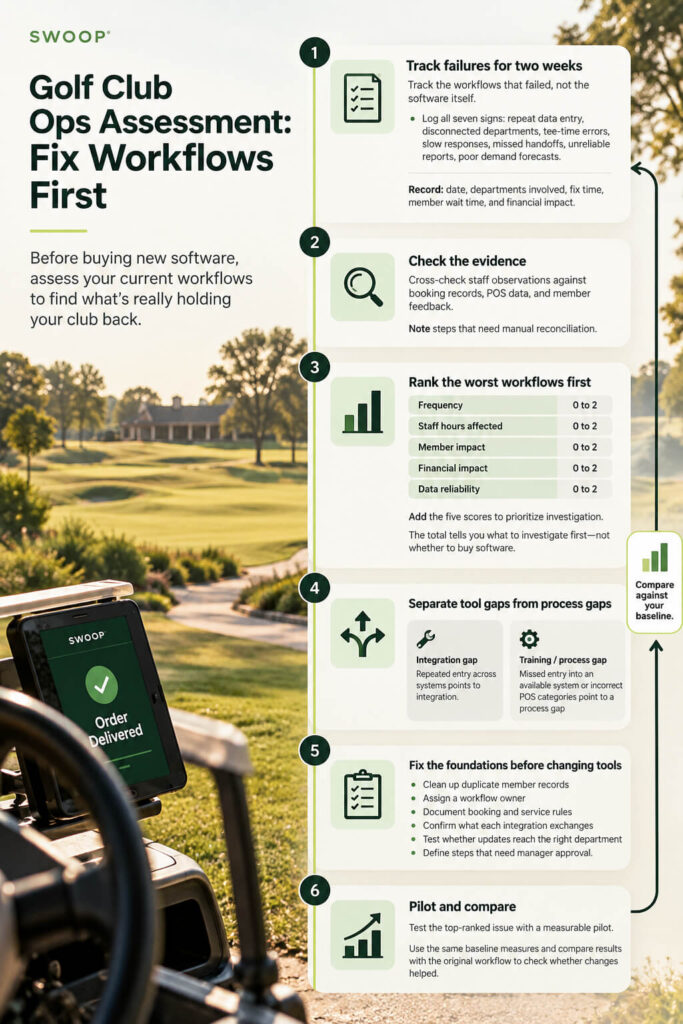
Once you’ve spotted the main failures, record them in one place. Track the workflows that failed, not the software itself. Log all seven signs for two weeks, including the date, departments involved, fix time, member wait time, and financial impact. Check staff observations against booking records, POS data, and member feedback. Note any steps that need manual reconciliation.
Use the scorecard to rank the worst workflows first. Give each sign a score from 0 to 2 for frequency, staff hours affected, member impact, financial impact, and data reliability. The total tells you what to investigate first – not whether to buy software.
Separate tool gaps from process gaps.
Repeated entry across systems points to integration, while missed entry into an available system points to training; incorrect POS categories point to a process gap.
Before changing tools, clean up duplicate member records and assign a workflow owner. Document booking and service rules, confirm what each integration exchanges, and test whether updates reach the right department. Define the steps that need manager approval.
Then test the top-ranked issue with a measurable pilot. Use the same baseline measures and compare the results with the original workflow to check whether the changes helped.
Conclusion: Fix Workflows, Not Just Software
The seven signs point to three workflow problems: poor data flow, weak handoffs, and delayed visibility. Better tools should fix broken workflows, not just move them onto a screen.
A club that pairs integrated ordering with clear process and training can improve revenue and service.
Connected software still needs people who own each step. Accurate data helps only when staff use it to act. Fix the workflow first, then use software to support it – not hide its problems.
FAQs
To calculate return on investment (ROI), compare revenue gains and savings from day-to-day work against the software’s cost. Track increases in food and beverage revenue and average order value, plus decreases in staff wait times, administrative labor hours, and manual data entry errors.
Monitor member adoption and repeat use of digital tools, too. These measures can point to long-term loyalty and continued revenue growth.
Use free trials, when available, to see how an operations tool fits your current systems, workflows, and day-to-day needs. Check whether it fits your course’s budget, can scale as your needs grow, and has the features you need to simplify daily tasks. Hands-on testing lets you check compatibility before making a long-term commitment.
Choose operations tools that fit your existing workflows and support – not replace – your current processes. Give staff focused, hands-on training before the full rollout so they can use the tools with confidence, maintain service standards, and reduce wait times.
Use free trials to check whether the tools meet your club’s day-to-day needs before committing to a full transition.
